Add Plugin Settings link to plugin page in WordPress
WordPress developers do many custom things with their plugins and themes above the basic functionality available at WordPress Codex.
WordPress developers do many custom things with their plugins and themes above the basic functionality available at WordPress Codex. Adding a plugin settings link in the plugin page just beneath your plugin could be one of those pretty custom things. If you don’t know what I’m saying, have a look at highlighted sections in the below screenshot: 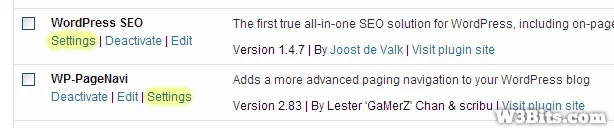 I did a quick research and found this cool snippet that lets you add the plugin settings page link beneath your plugin on the plugins page in WordPress.
function my_plugin_settings_link($links) {
  $settings_link = '<a href="options-general.php?page=plugin-options.php">Settings</a>';
  array_unshift($links, $settings_link);
  return $links;
}
$plugin = plugin_basename(__FILE__);
add_filter("plugin_action_links_$plugin", 'my_plugin_settings_link' );
Just add the above code to your plugin PHP file, and don’t forget to replace the text in green to your plugin settings file.

Written by Rahul C.
Founder and curator of W3Bits. Have questions, suggestions, or anything to say about this post? Reach out on X or send me an email.